On-page SEO for plumbers and electricians is the work of giving Google one clear page per service and per suburb, with the words it reads sitting where it reads them.
Two plumbing pages in the same Sydney suburb show what that buys you. One carries the suburb in its title tag, the blue link text at the top of a search result, in its H1 and in its URL, and it holds a top-three spot. The other says “Plumbing Services” in all three places and sits at the bottom of page one.
Both were built by tradies who paid for a website, and only one of them told Google which search it was for. This guide covers what the top three pages do differently, how long a page should run, the title and H1 pattern that keeps turning up at position one, the schema worth adding, and a checklist you can work down on a single page.
In this guide
What on-page SEO means for a trade website
Owners ring us and ask for the website to be fixed. That phrasing hides the unit of work, because Google does not rank websites.
It ranks pages, one at a time, for the searches each page is obviously about. A site can be fast, tidy and well designed and still hold no page that answers “electrician Blacktown”.
The page is the unit
We captured 1,000 AU plumber and electrician searches on 5 to 6 August 2026 and pulled 657 page-one business pages out of them, 210 of them in the top three and 184 at positions 8 to 10. 77.8% of those pages were dedicated suburb pages rather than homepages.
The top three were blunter still. Of the 210 top-three pages, 166 were suburb pages and only 42 (20.0%) were homepages.
I read that as the clearest instruction in the whole dataset. A homepage can carry one head term for one suburb, and every other suburb you want work in needs a page of its own.
What Google reads on it
Five parts of the page carry most of the signal. The title tag and the H1 say what the page is for, the URL repeats it, the body copy proves it, and structured data labels the whole thing in a format a machine reads without guessing.
None of that is set and forget. Google may rewrite the title link it shows in the results, and its documentation on how Google builds title links says it draws on the title tag, the headings and other text on the page.
Write all five to say the same thing and there is nothing left for Google to guess at.
Where links and Maps fit in
On-page work makes a page eligible. What decides the order between eligible pages sits mostly off it, in the links pointed at your site and in your Google Business Profile for the map pack.
They stack in a known order. Our guide to SEO for trade businesses is the parent to this one, local SEO for plumbers and electricians covers the profile and the pack, and link building for trade businesses covers the off-site half.
Pages come first, though. Until the page exists, a link has nothing to lift and a listing sends people to a homepage answering a different question.
What the top three pages do that the bottom of page one doesn’t
Shorter pages won. Across the 657 page-one business pages, the top three ran a median 618.5 words against 701 at positions 8 to 10. Word count was not the only measurement that ran backwards, and the elements that did separate the two groups turned out to be the cheapest ones on the page to change.
Here is how the two groups compared on the elements that sit on the page:
| Element | Top three | Positions 8 to 10 |
|---|---|---|
| Suburb in title tag | 96.7% | 85.9% |
| Suburb in H1 | 80.0% | 69.0% |
| Suburb in URL | 85.2% | 76.6% |
| Exactly one H1 | 75.2% | 73.4% |
| No H1 at all | 6.7% | 10.3% |
| Median word count | 618.5 | 701 |
| Median title length | 44 characters | 47.5 characters |
| Review schema | 43.3% | 36.4% |
| FAQ schema | 17.1% | 16.8% |
| Any structured data | 88.1% | 88.6% |
The suburb, three times
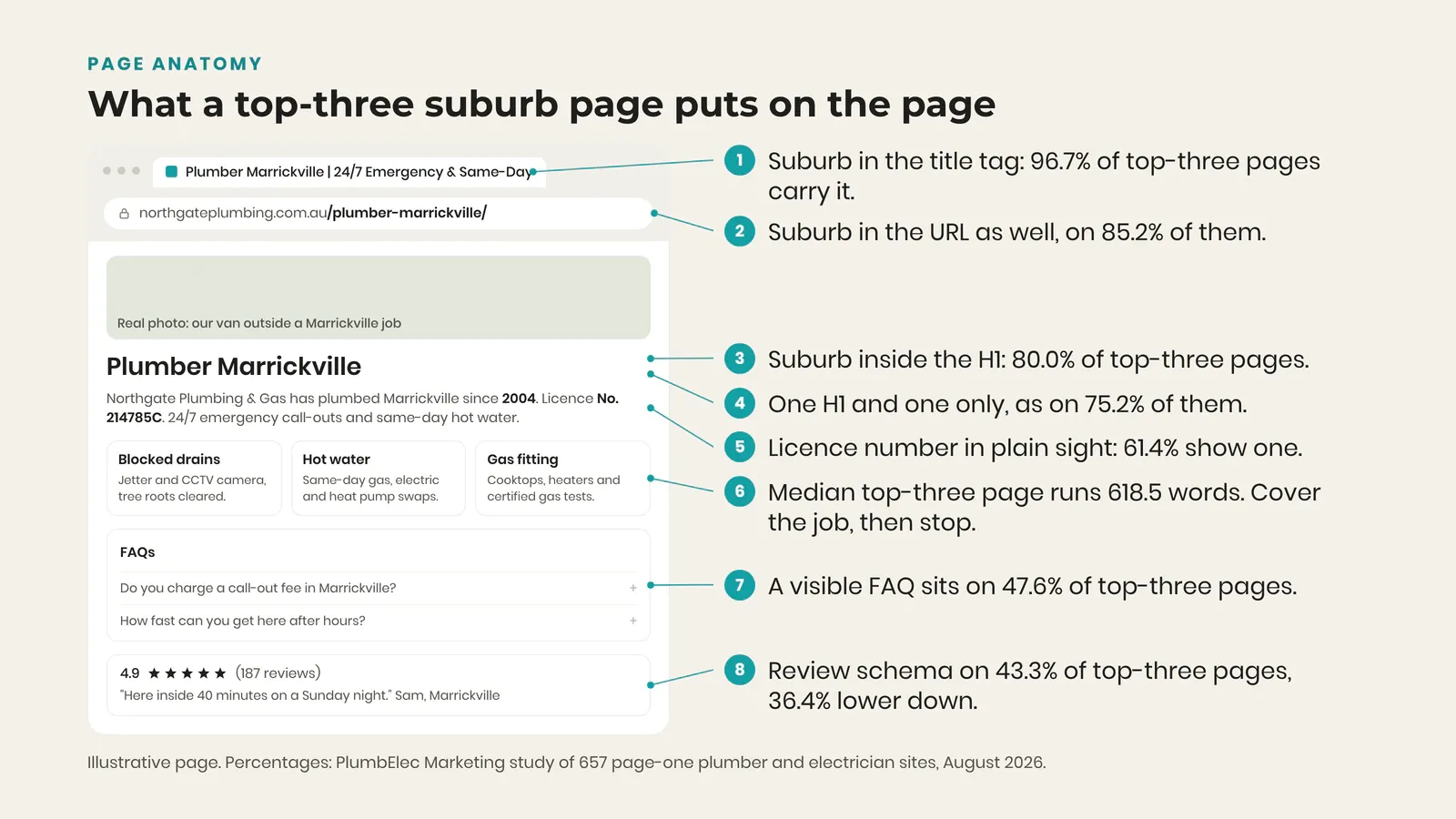
Three rows in that table move together. The suburb sits in the title tag on 96.7% of top-three pages against 85.9% lower down, in the H1 on 80.0% against 69.0%, and in the URL on 85.2% against 76.6%.
That is the widest separation in the dataset, and it is a correlation inside one snapshot rather than proof of cause. It is also the cheapest item on the list to fix.
The pages at positions 8 to 10 were not missing the suburb altogether. 85.9% of them had it in the title as well, which puts the gap in doing all three at once rather than in doing any one of them.
Length is not the lever
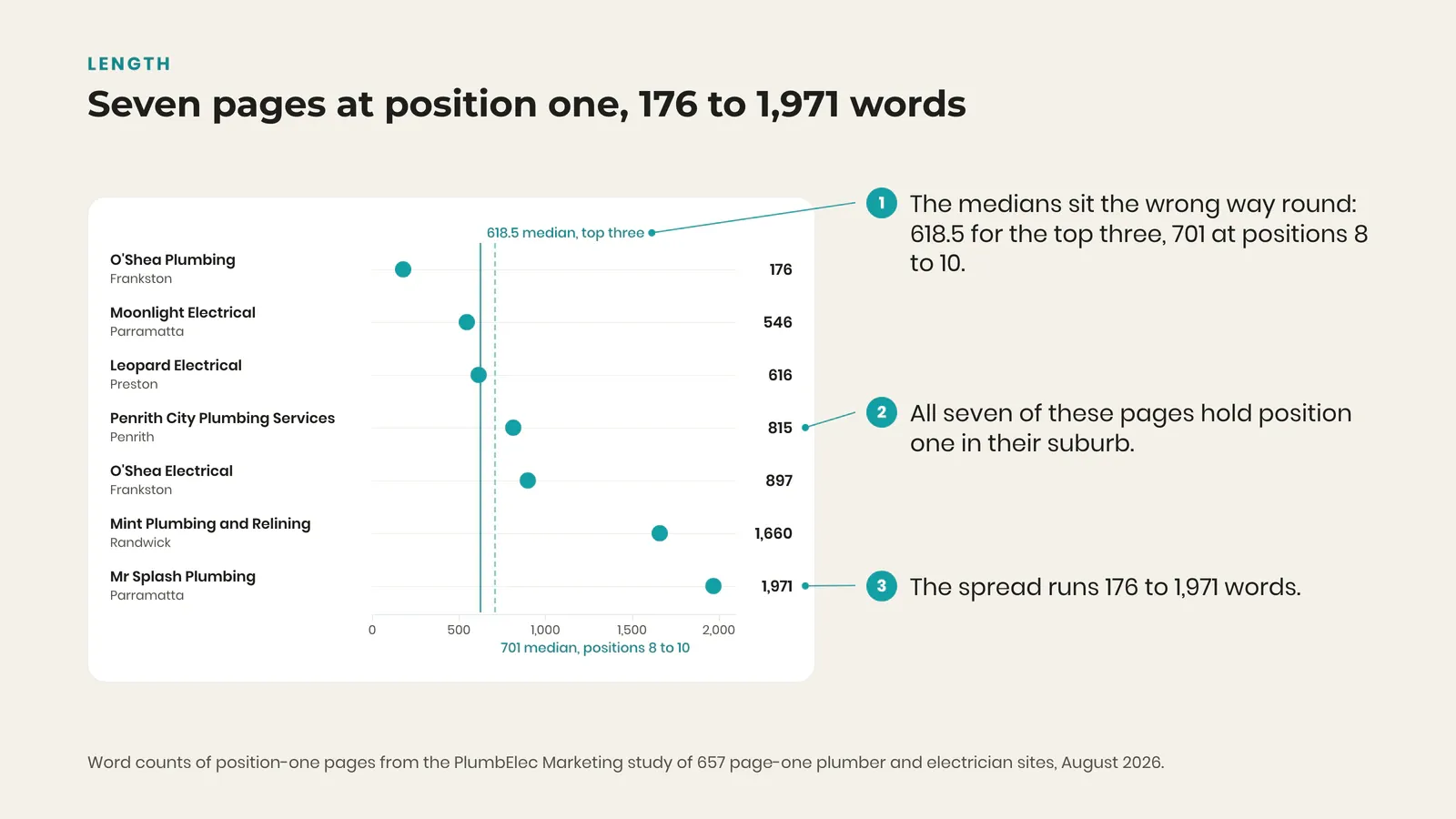
The median top-three page ran 618.5 words. Its interquartile range was 385.5 to 980 words, against 418 to 1,084 for the pages sitting at positions 8 to 10. The two ranges overlap across most of their span, which is not the shape of a measurement doing the separating.
Position-one pages we checked by hand spread wider again. O’Shea Plumbing holds position one in Frankston on 176 words, and Mr Splash Plumbing holds it in Parramatta on 1,971.
So there is no word count to write to. Cover the job properly for that suburb, stop when it is covered, and put the leftover hour into the other rows in the table.
Schema is table stakes
Any structured data at all was flat, at 88.1% for the top three against 88.6% at positions 8 to 10. Both groups already carry it, so having it separates nobody now.
Review schema is where the daylight sits. 43.3% of top-three pages carried it against 36.4% at positions 8 to 10, while FAQPage schema barely moved, at 17.1% against 16.8%.
Which makes review markup the piece worth adding this month. A visible FAQ section is a separate decision, and 47.6% of top-three pages had one against 52.2% lower down, which puts the FAQ back where it belongs, with the customer.
Seven pages that hold position one
We hand-checked the position-one pages for seven businesses. Every one carried the suburb in the title, the H1 and the URL, had exactly one H1, and had structured data present. Mr Splash Plumbing holds position one in Parramatta and Blacktown on 1,971 words with Plumber, FAQPage and Service schema.
The rest run far shorter. Penrith City Plumbing Services holds Penrith on 815 words with LocalBusiness schema, Mint Plumbing and Relining holds Randwick on 1,660 words with Plumber schema, O’Shea Electrical holds Frankston on 897 words and Glen Waverley on 940, Moonlight Electrical holds Parramatta on 546, Leopard Electrical holds Preston on 616, and O’Shea Plumbing holds Frankston on 176. Against the redesign most owners reach for first, the list that actually separated these pages is short and dull.
Data: PlumbElec Marketing study of 1,000 AU plumber and electrician searches, captured 5 to 6 August 2026.
Title tags and H1s for a plumbing or electrical page
Your title tag is the fastest change on this list. It is one line in your CMS, it takes a minute, and it carries one of the widest measured differences between a top-three page and one at the bottom of page one. Plenty of trade sites still spend it on the business name.
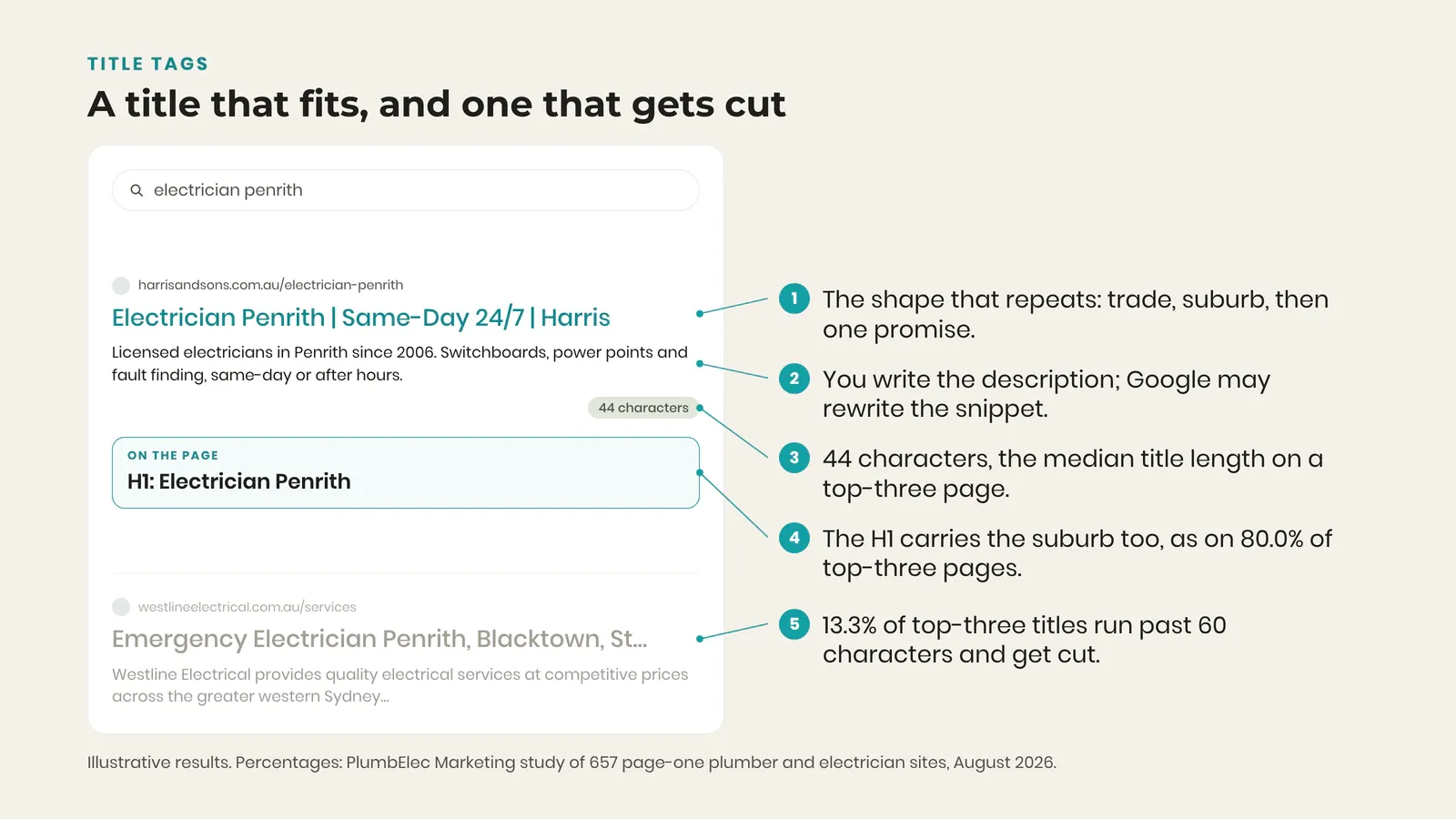
Here is the pattern the top-three pages in our study kept landing on:
- Pattern: “[Trade] [Suburb] | [promise]” is the shape that repeated across every position-one page we checked by hand.
- Length: the median top-three title ran 44 characters, and only 13.3% went past 60 against 14.1% at positions 8 to 10.
- One H1: 75.2% of top-three pages had exactly one H1, and 80.0% of top-three pages had the suburb inside it.
- Promise: 24/7, same-day and $0 call-out are what the top-three examples put after the pipe.
- Meta description: Google writes the snippet from the page content and your description, so make it a short, accurate summary of the page rather than a slogan.
What Google does to your title
Google may not show the title you wrote. It rewrites title links when it decides something else on the page describes it better, working from the title tag, the headings and the other text sitting there.
Which is an argument for consistency rather than for cleverness. Write the title, the H1 and the first line of the page to say the same thing and a rewrite lands somewhere you would have written anyway.
It is also an argument against stuffing. A title carrying five suburbs hands Google five things to choose from, and it will choose one of them for you.
Three titles worth copying
Three come from the position-one pages in our field check, all of them plumbers and electricians holding the top spot in their own suburb. Mr Splash Plumbing ranks first in Parramatta and Blacktown with “Plumber Parramatta: 24/7 Emergency & Same-Day Service”, which puts the trade and the suburb first and the promise after.
Mint Plumbing and Relining holds position one in Randwick with “Reliable Plumber Randwick | $0 Call-Out Fee | 5 ★”, which fits the suburb, the offer and the rating into one line.
Moonlight Electrical holds position one in Parramatta with “Electrician Parramatta | Available 24/7”. Rewrite your five best pages this week on that shape, one trade, one suburb, one promise each.
Service pages and suburb pages: one job per page
One “Services” page listing forty jobs is the most common shape we inherit. It tries to rank for hot water, blocked drains, gas fitting and leak detection at once, so Google cannot tell what it is for, and neither can the customer who landed there looking for one of the forty.
One service, one page
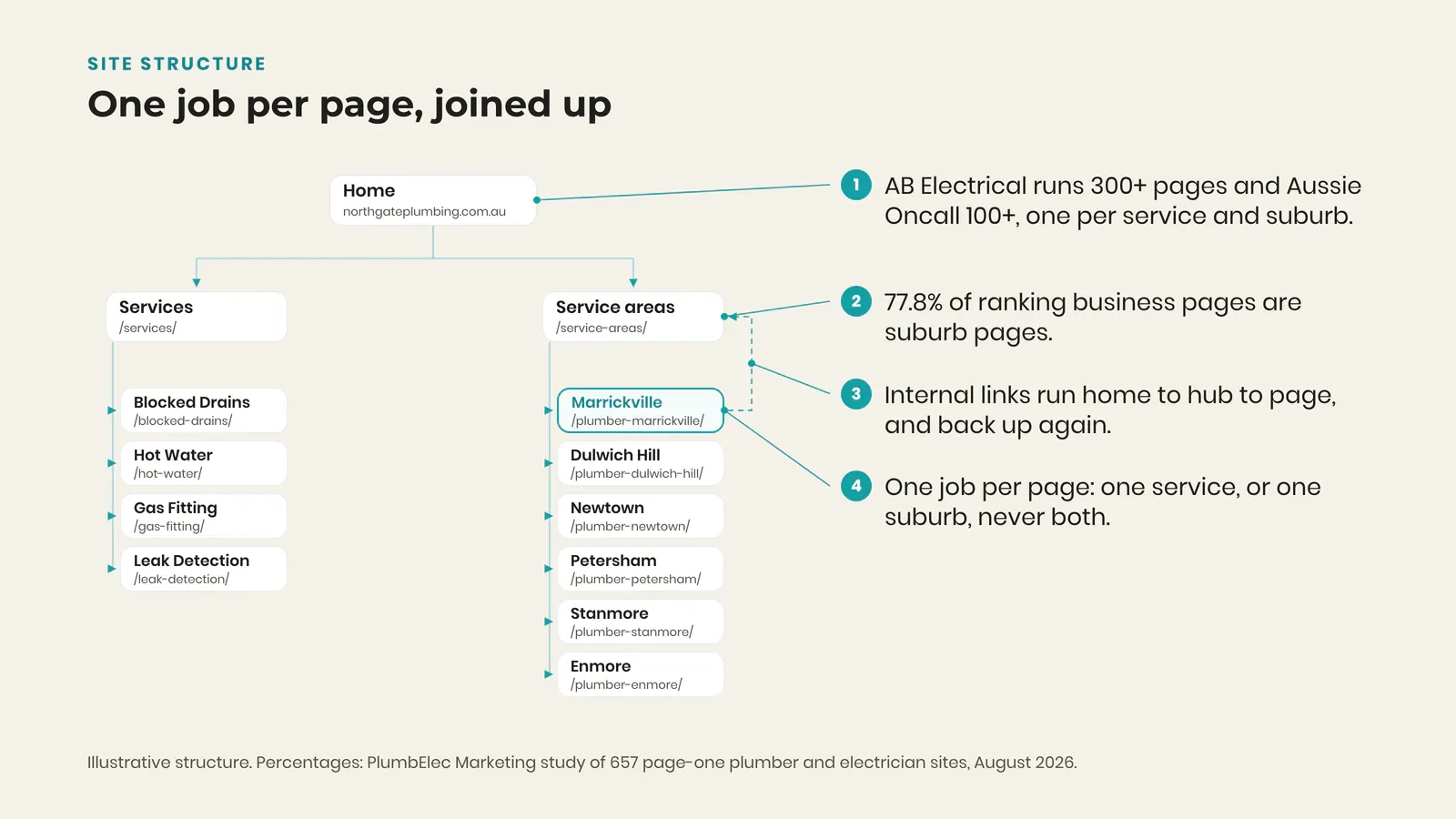
Give each job its own page and the title, the H1 and the body can all say the same thing. A page called “Blocked Drain Repairs” can name the jetter, the CCTV camera, the tree roots and the cost band without competing with your hot water page.
The test is whether you could send that page to a customer who rang about that one job. If you would have to tell them to scroll past two other services, the page is doing two jobs.
Start with the work that actually pays. Six pages covering your six best earners beat forty thin ones.
One suburb, one page
Then repeat it by suburb. Our guide to location pages for trade businesses covers what belongs on one, and the short version is the local housing stock, the jobs you do there and the problems that area’s pipework or wiring throws up.
The page counts get high, and that is the point. AB Electrical runs over 300 pages, one for each service and each suburb, and takes 125+ organic leads a month at a 33X return.
Aussie Oncall Plumbing built over 100 pages across its services and service areas and reached 50+ organic enquiries a month inside 12 months, a 16X return.
How the pages connect
Pages on their own are a pile. Structure turns them into something Google can crawl and a customer can move through, and our guide to website structure for trade businesses sets out the hub and spoke we build to.
Internal linking is the mechanism. Each service page links down to its suburb pages, each suburb page links back up to the service, and the anchor text says what is on the other end instead of “click here”.
Three or four links per page, placed in the body copy, does that job. Links sitting only in a footer menu carry very little of it.
What one page needs to say
The specifics convert, and they get quoted. 61.4% of top-three pages showed a licence number against 51.6% at positions 8 to 10, and 31.4% of all the sites we checked claimed a licence without showing the number.
AI answers ask for the same things. Across 225 AI-recommended trade businesses over 46 Australian keywords, years in business was stated in 64% of answers and 24/7 availability cited for 53%.
So put the licence number, the years trading, the hours and the guarantee on the page in plain words. Leave them off and you lose the customer comparing three tabs and the assistant hunting for a number. If you want it written across every service and suburb page, that is the work in our SEO services for plumbers and electricians.
Schema markup that earns its place
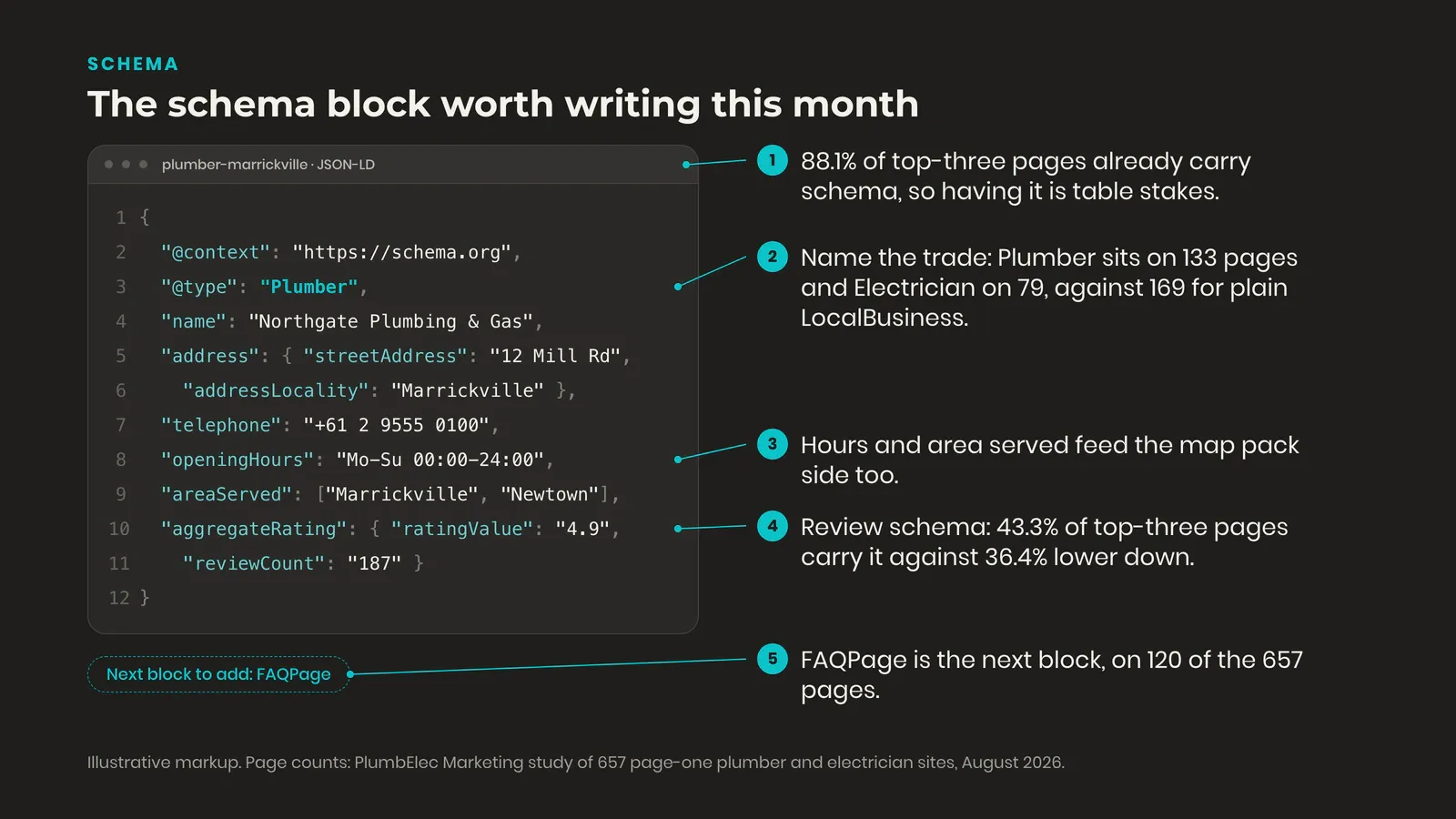
88.1% of top-three pages carry some structured data, and so do 88.6% of the pages down at positions 8 to 10. On that reading schema looks like a dead end. The difference is in which types are used, because the label you put on the page matters more than whether a label exists.
LocalBusiness, Plumber, Electrician
Across the 657 pages, the common types were generic rather than local. SiteNavigationElement appeared on 456 pages, WebSite on 418, BreadcrumbList on 375, Organization on 371, WebPage on 346 and ImageObject on 318.
The types that say what the business actually is were rarer. LocalBusiness appeared on 169 pages, Product on 141, Plumber on 133, FAQPage on 120, Electrician on 79 and Service on 75, and 374 pages carried no local subtype at all.
LocalBusiness markup covers the name, address, phone, hours and business type, and Plumber and Electrician are the subtypes that name the trade rather than the category.
Review and FAQ schema
Review schema is the gap worth closing. 43.3% of top-three pages carried it against 36.4% at positions 8 to 10, one of the widest separations anywhere in the dataset.
FAQPage schema is thinner ground. It sat on 17.1% of top-three pages against 16.8% lower down, and only 120 of the 657 pages carried it at all, so it separates nobody.
A visible FAQ section runs the other way again, at 47.6% of top-three pages against 52.2% at positions 8 to 10. Write the FAQ for the customer who has the question, then mark it up because the markup is free.
What structured data cannot do
Structured data helps Google understand a page and can make it eligible for rich results. Eligible is the word doing the work in that sentence.
It will not make a thin page rank, and it cannot claim something the page itself does not say. Marking up a rating you do not have is the fastest way to lose the rich result and the trust that came with it.
Add the local subtype, add review markup where you genuinely have the reviews, then stop there. The separation sat in the pages themselves, which is where the next three items on the list live.
Images, speed and the things that don’t move rankings
Top-three pages in our study loaded worse than the pages below them. Median Lighthouse performance was 0.40 for the top three against 0.50 at positions 8 to 10. Speed is real work, and it is not what holds your page at position nine.
Real photos over stock
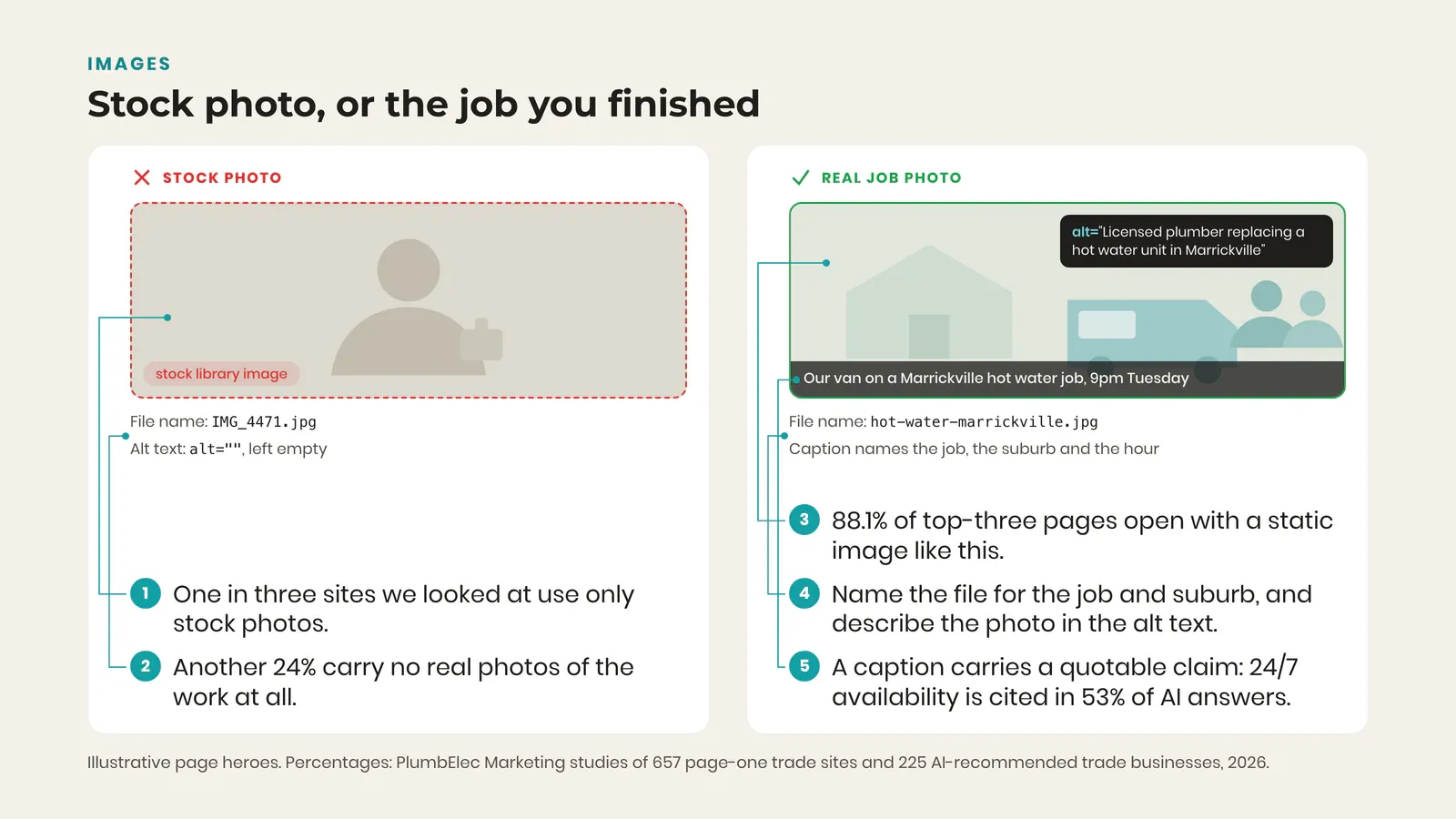
One in three of the sites we looked at used only stock photos, and another 24% had no real photos at all. Neither choice puts anything on the page proving the business turns up in that suburb.
The top three open plainly. 185 of the 210 top-three pages (88.1%) start with a static image, 13 use a slider, 8 use a video and 4 open with text alone.
Photos of your van, your team and the job you finished in that suburb do something no stock image can, because they read as evidence to a customer deciding who to ring.
Alt text and file names
Alt text describes the image for a screen reader and for Google, so write what is actually in the picture and name the suburb when the photo genuinely came from there. “Licensed electrician replacing a switchboard in a Frankston home” beats “electrical services” every time.
File names get read the same way. Save the photo as switchboard-upgrade-frankston.jpg rather than IMG_4471.jpg before it goes anywhere near your CMS, because the file name travels with the image.
Neither one is a ranking lever on its own. Both take seconds per image, and together they make the page legible to a reader who cannot see it.
Speed is not the gap
Those Lighthouse numbers sit at a median 0.40 for the top three and 0.50 at positions 8 to 10, across all 657 page-one business pages.
Read it as a correlation inside one snapshot rather than an argument for a slow site. A page that crawls on a phone loses the customer whether or not it ranks, and compressing the images and dropping the sliders costs you an afternoon.
If the build itself is the problem, that is the ground our website design for trade businesses work covers. Speed buys you a better visit, while the suburb in the title tag is what buys you the visit at all.
Writing for the AI answer as well as the blue link
“We provide quality service at competitive prices” turns up on trade website after trade website, and it hands an AI assistant nothing to repeat. When one recommends a plumber, it quotes something specific off a page it read: a number of years, a licence, an hours claim. A page carrying no specifics gets passed over for one that does.
Specific sentences an assistant can lift
In the same study of 225 AI-recommended trade businesses, 84% of them were cited from their own website. The assistant read the business’s own page and repeated back what it found sitting there.
What it found was specific. Years in business appeared in 64% of answers and 24/7 availability in 53%, so the pages getting quoted are the ones carrying a plain sentence that names the trade, the suburb, the year the business started and the hours it answers the phone.
Blog content without supporting structure was rarely cited at all, which puts your service and suburb pages back at the centre of the job rather than the blog.
The same page, two readers
One page serves both readers without any trickery. A homeowner scanning for whether you are licensed and whether you will come out tonight wants the same sentence an assistant wants to quote.
So write the fact once, early, in plain words, and put it near the top of the page as well as inside your structured data. Our AI SEO guide for plumbers and electricians covers where the assistants read from and how a trade page earns a mention in the answer.
Write that sentence today. It is the cheapest item on this whole list and it works on both readers at once.
An on-page checklist for one trade page
Ten rows, one page, and you can work the whole list in an afternoon. This is the check we run on every trade page before it goes live and on every page we inherit, and it catches most of what separated the top three from the bottom of page one in our study.
Work down this list on any service or suburb page before you publish it:
| Element | Rule | Where it goes |
|---|---|---|
| Title tag | Trade, suburb, one promise, under 60 characters | Page title field |
| H1 | One only, with the suburb inside it | Top of the page |
| URL | Trade and suburb, no dates or numbers | The slug |
| Intro | Names the job and the suburb in the first sentence | First 100 words |
| Sections | One H2 per part of the job, H3s for the detail | Body copy |
| Licence and hours | Licence number, years trading, hours, guarantee | High on the page and in the footer |
| FAQ | Six questions your office answers by phone each week | Below the body |
| Schema | LocalBusiness, Plumber or Electrician, plus review markup | Head of the page |
| Images | Real photos, described alt text, named files | Through the body |
| Links | Up to the service hub, down to the related suburbs | Body copy |
How an on-page fix moved rankings
The clearest on-page-only result we hold is not a trade client, so read it as proof of method rather than a trade benchmark. An auto repair business in Toronto came to us with an on-page score of 42.2, and we ran an on-page campaign across its pages from 2020 to 2024. “Mechanic Mississauga” went from position 26 to position 2 inside four months, and “Auto repair North York” from position 106 to position 4.
On the trade side, Guardian Plumbing’s targeted service pages lifted website visits 181% and phone calls 120%, and the business holds number one locally for blocked drains.
Work the table top to bottom on your best five pages, or hand it to someone who does it weekly, which is the job in our SEO services for plumbers and electricians. Four items on it carry most of the result, and they are worth naming plainly.
Conclusion
Four things decide whether a trade page ranks, and none of them take a month. The suburb goes in the title tag, the H1 and the URL, because that was the widest gap between the top three and the bottom of page one. One page does one job, so a service gets a page and a suburb gets a page, and neither tries to cover the other.
The page then says the specific things a customer and an assistant can both use, which means the licence number, the years, the hours and the guarantee. Structured data labels all of it, with review markup as the piece most of the field still skips.
Length is not on that list, and neither is speed. Both matter to the homeowner standing in a wet laundry at 9pm, and neither is what separated position two from position nine in our sample.
FAQs
How long should a plumbing or electrical service page be?
Long enough to cover the job. Top-three pages in our study ran a median 618.5 words, and position-one pages ranged from 176 to 1,971, so length is not the lever.
Should I put the suburb in my title tag?
Yes. 96.7% of top-three pages carried the suburb in the title tag against 85.9% of pages at positions 8 to 10, the widest single gap we measured.
Do I need a separate page for every suburb?
For every suburb you want work in, yes. 77.8% of ranking business pages in our study were dedicated suburb pages, and 166 of the 210 top-three pages were too.
What schema should a tradie website use?
LocalBusiness or the Plumber or Electrician subtype, plus BreadcrumbList and review markup. Across 657 pages, LocalBusiness appeared on 169, Plumber on 133 and Electrician on 79.
Does page speed affect my rankings?
Not enough to explain the top three. Median Lighthouse performance was 0.40 for top-three pages against 0.50 at positions 8 to 10, so the faster pages were ranking lower.
How many H1 tags should a page have?
One. 75.2% of top-three pages had exactly one H1, 18.1% had more than one, and 6.7% had none at all against 10.3% at positions 8 to 10.
Get your pages checked against the top three
Which of your suburb pages has the suburb in the title, the H1 and the URL right now? If the answer is none of them, that is a morning’s work with a measurable result. We will check the title, H1, URL, schema and licence line on your five best pages against what the top three in your suburbs are doing.
PlumbElec Marketing works with plumbers and electricians across Australia. Call (02) 9100 0985, book a time that suits you, or read how our SEO services for plumbers and electricians work.